Spatial De-identifier
Turns county- and ZIP-level variables into categories so that no combination of categories identifies a State-ZIP or State-County. The app then finds the largest set of variables that can be released together.
View on GitHub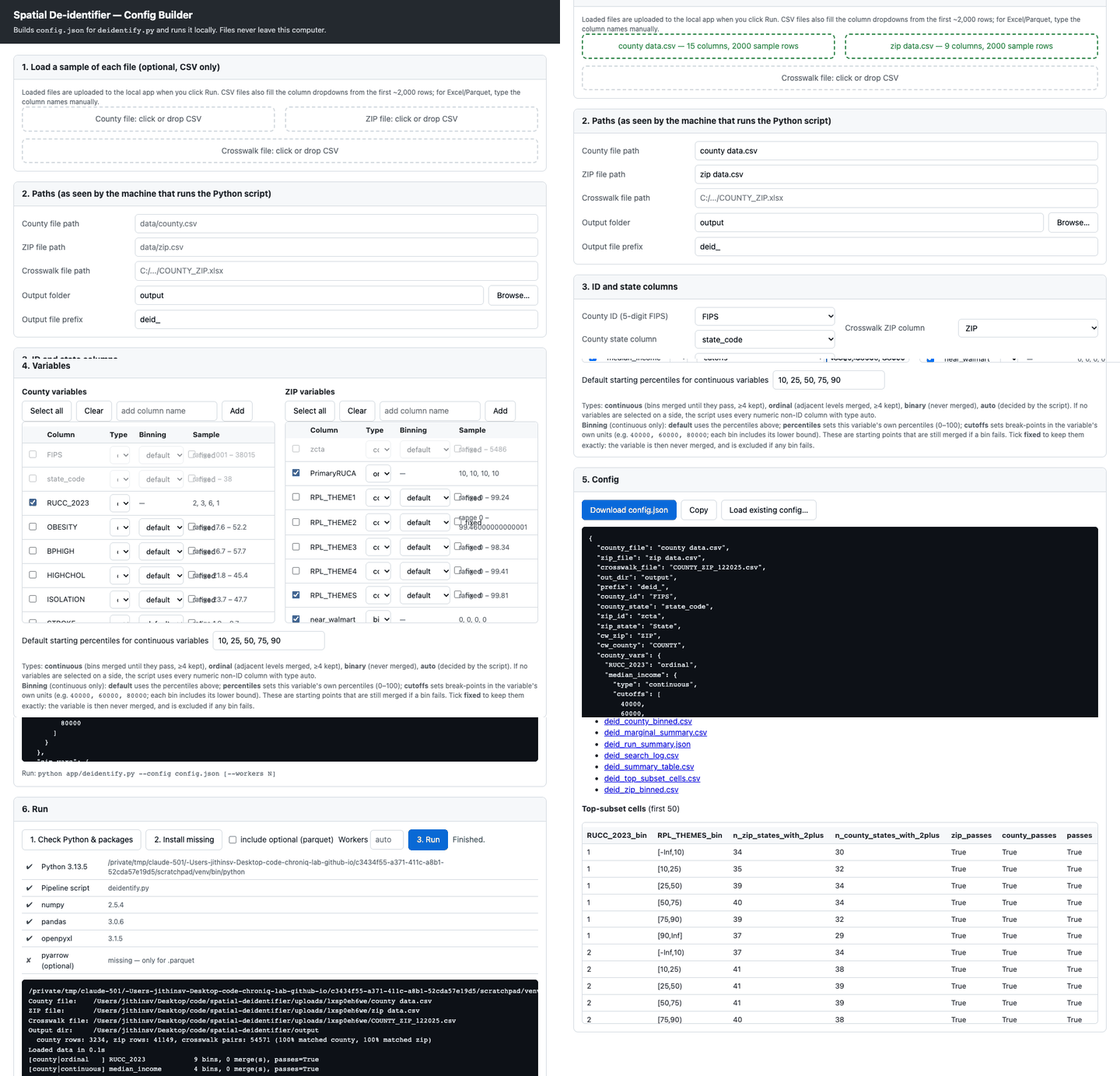
Demo: load the files, pick variables, run, and review the top subset and output files.
The pass rule
Every cell (one combination of categories) must contain either:
- at least 2 ZIPs in each of at least 2 states, or
- at least 2 counties in each of at least 2 states.
How it works
Phase 1: categorise each variable on its own
Continuous variables start from the 10/25/50/75/90th percentiles (or your own percentiles or cutoffs), and ordinal variables from their levels. Failing categories are merged with a neighbour, keeping at least 4. Binary variables are never merged. A variable that still fails is excluded.
Phase 2: combine variables
Sets of variables are tested in increasing size. A set is skipped if a smaller set inside it already failed, and failing sets are coarsened by one merge where possible. The search stops when no set of the next size passes. Ties are ranked county + ZIP first, then ZIP only, then county only.
Getting started
Everything runs on your machine; nothing is uploaded. You need Python 3.9 or newer.
- Clone the repository from GitHub.
- Launch the app: double-click
app/launch.bat(Windows) or runbash app/launch.sh(macOS/Linux). It opens athttp://127.0.0.1:8765. - Load the county file, the ZIP file and the ZIP↔county crosswalk (.csv, .xlsx or .parquet).
- Choose the output folder, the ID and state columns, and the variables and their types.
- Run. The app shows the top subset and download links for every output file.
Or use the command line (requires numpy, pandas and openpyxl):
python app/deidentify.py --config app/example_config.json [--workers N]
Output files
run_summary.jsonOne-page overview of the run, including the top-ranked subset.
top_subset_cells.csvOne row per cell of the top-ranked subset, with counts and pass flags.
all_top_subsets_cells.csvThe same cell table for every subset tied at the largest size.
county_binned.csv / zip_binned.csvInput files with each surviving variable replaced by its final category.
bin_defs_final.jsonFinal category definitions, for applying the same categories to new data.
search_log.csv, marginal_summary.csv, config.jsonDiagnostics: every set tested, Phase 1 results and the exact configuration used.
Only the variables in a top subset are guaranteed safe together. The binned files include every variable that passed Phase 1, so keep only the columns of the chosen subset before releasing data.